
 HOME
| |
| ABOUT IDinc |
| |
| HISTORY |
| |
| CONTACT US |
|
|
 PRODUCTS
Incident
Patient Relations
Employee Injury
Claim
Security
Peer Review
Chart Review
Score Card
Documentation Review
RAC Denials
Contract and License
HIPAA Disclosures
Policy Management
Free Patient Safety Manager
| |
| RISK |
| |
| QUALITY |
| |
| COMPLIANCE |
| |
| E-FORMS |
| |
| FREE PSM |
|
|
 SERVICES
|
 |
| |
 |
|
|
| Technology |
| IDinc develops and services a Rules-based Workflow Engine designed specifically to meet the information management requirements of Risk, Quality and Compliance in healthcare provider settings. The many features of the software can be turned on or off based on the client's functionality requirements. |
| The solution is offered as an Internet Application eliminating the upfront investment requirement. Alternatively, it can be delivered to run on clients' existing IT environment. The solution uses Microsoft's .net Technology and Data Base Management System. |
| Design Philosophy |
| All of IDinc's solutions are "Workflow" based to facilitate a "Management by Exception" method of operation. IDinc believes that managers need better tools than printed reports or data on computer screens to effectively manage their organization. Well-designed applications must allow organizations to modify and enforce their workflow at will, be intuitive enough to require minimal or no training, and notify management when their attention is required. IDinc solutions integrate with the client's email system to inform, remind and escalate action items. |
|
| IDinc's Workflow Engine is the brainchild of Didier “D” Salem. Educated as an Engineer with an MBA in Information Systems, “D” started his career as a Quality Engineer with several Computer firms. He then spent 13 years with Soft Computer Consultants, a developer of Clinical Information Systems for Hospitals, starting as a Sales and Marketing Representative and climbing the ladder to Chief Operating Officer. |
| In 2002 “D” decided to found International Developers Incorporated (IDinc) to take advantage of the maturing Internet technologies. The initial project was an Incident Management System developed for Munroe Regional Hospital in Ocala Florida. A dozen hospitals and several homegrown and commercial solutions were analyzed during the design phase. Combining these findings and his experiences in Quality and Operations Management “D” designed a Workflow Engine that would help organizations drive their desired processes. Initially optimized to handle adverse events, the Workflow Engine has grown to handle a multitude of requirements all in the healthcare provider setting. |
|
International Developers Inc.
3278 Masters Drive
Clearwater, Florida 33761-1819
Telephone: 727-460-8820
Email: Sales@InternationalDevelopers.net
Please take a moment to fill out the contact form.
|
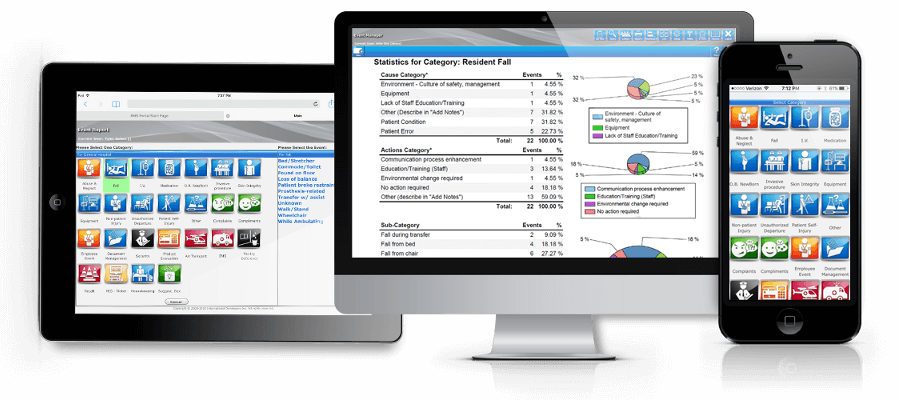
| IDinc's EMS allows on-line reporting of events from any workstation in the organization. Users do not need to be set up in the system to report events. Designed to require zero training and easier than filling out paper forms, it encourages clinicians to report incidents by clicking on various options, all customized to match the nomenclature used in the client's organization. Patients, employees, physicians demographic data and the medication formulary is electronically preloaded via interfaces. |
Specific Screens allow capture of relevant information per event type such as:
| Medication Error |
Patient Fall |
OB/GYN |
| IV Issue |
Pressure Ulcer |
Invasive Procedure |
| New Born |
Device/Supply |
Adverse Drug Reaction |
|
| Tasks such as cause analysis and corrective actions are assigned automatically and notifications are made through the email. Reminders and escalation notices are fully customizable and assure adherence to regulatory requirements. |
| EMS automatically notifies the department managers when patients with prior history of critical events (i.e. suicide watch, combative, prior event with injury... etc.) are admitted or transferred. |
| A comprehensive set of standard reports, graphs and an adhoc report generator enables management to keep track of trends and monitor the timeliness of quality improvement efforts. |
| Compared to a paper-based process, EMS provides an overwhelming Return on Investment (ROI) benefit in the range of 500 -1000%. The system pays for itself within the first few months. |
| EMS also allows electronic submitting of data to Patient Safety Organization's (PSO) to help provider organizations compare and protect their data from discovery. |
| Major Features and Functions |
 |
Use network id/password to report events |
 |
Interfaces to various systems to pre-load patients, physicians, employees and medications |
 |
On-line reporting of Incidents, near misses, unsafe conditions and others |
 |
Email based notifications, reminders and escalations |
 |
Fully customizable screens and task assignments to fit the organization |
 |
Automatic notification of arrival of “trouble” patients |
 |
Sophisticated Role based Dashboard for real-time query and analysis |
 |
Standard and ad hoc reports viewable with a few clicks and transferable to Excel |
 |
Submit Data to Patient Safety Organizations electronically |
|
|

Click to see full screen


|
| IDinc's Patient Relations Manager allows on-line reporting of Patient feedback such as grievances, complaints, compliments, billing disputes and timeliness of service by employees or patients from any workstation in the organization. Designed to require zero training and easier than filling out paper forms, it encourages logging of patient feedback by clicking on options, all customized to match the nomenclature used in the client's organization. |
| Tasks such as Review, Corrective Action and Reply to Patient are assigned automatically and notifications are made through email. Reminders and escalation notices are fully customizable and assure adherence to regulatory requirements and the organization's policies. |
| The system automatically notifies the department managers upon the arrival of patients with prior history of critical feedback (i.e. complaints, grievances...etc.) |
| A comprehensive set of standard reports, graphs and an ad hoc report generator enables management to keep track of trends and monitor the timeliness of Patient Satisfaction improvement efforts. |
| Compared to a paper-based process, the IDinc system provides an overwhelming Return on Investment (ROI) benefit in the range of 500-1000%. In all cases the system pays for itself within the first few months. |
| Major Features and Functions |
 |
On-line reporting of Patient feedback customizable per client |
 |
Automated Task Assignments such as Review, Corrective Action and Reply to Patient |
 |
Email based notifications, reminders and escalations |
 |
Attachment of received and sent communication to the record |
 |
Automated follow up Form letter generation |
 |
Fully customizable screens and task assignments to fit the organization |
 |
Automatic notification of arrival of “trouble” patients |
 |
Sophisticated Role based Dashboard for real-time query and analysis |
 |
Standard and ad hoc reports viewable with a few clicks and transferable to Excel |
|
|

Click to see full screen


|
| IDinc's Security Event Manager is used by uniformed security officers to log and manage their activities. With this module you can standardize the event reporting and management process and consolidate all the data relevant to an incident by attaching all related pictures and documents to the event. |
| A comprehensive set of standard reports, graphs and an adhoc report generator enables management to keep track of Security Officer's activity. |
Specific modules include:
 |
Patient Care Cases of combative patient, baker act, restraints...etc. are logged and managed according to the organizations policies. |
 |
Activity Log Cases such as Alarms, Assistance, Criminal Activity, Disturbance, Lock Down, Investigations, Suspicious Person Search, Trespassing...etc. are managed with this option. |
 |
Lost and Found A sophisticated inventory management system tracks lost and founds items. It automatically matches lost to found items and records return to owners and disposals to local agencies. |
 |
Vehicle Accidents Information related to vehicular accidents, including police reports and schematics of the damage and other relevant information is tracked with this module. |
|
| Major Features and Functions |
 |
On-line reporting of events with unlimited security types of event customized per client |
 |
Roles based access to protect security information |
 |
Picture capable on found items |
 |
Automated Task Assignments such as Initial Response, Corrective Action |
 |
Standard and ad hoc reports viewable with a few clicks and transferable to Excel |
|
|

Click to see full screen


|
| IDinc’s Policy Manager consists of 2 modules which can be used together or independently. When used together , they provide a high degree of integration, substantially facilitating the Policy Management effort of the typical provider. |
| The Document Control Module facilitates all activities related to the lifecycle of the policies including authoring, versioning, routing for review and approval, notifying, approving and archiving of the documents. It is the repository of time critical documents that need to be reviewed periodically. |
| The Policy Viewer Module allows posting of the policies on the organizations Intranet and allows searching of the documents for keywords. The Viewer can post and search documents included in the Document Control Module, included anywhere in the client's organization (Intranet) or anywhere in the Internet, such as CMS or Joint Commission. |
| Major Features and Functions |
 |
Manage the creation, routing for review/approval and archiving of documents |
 |
Use the Rules Engine to automatically assign reviews to individuals |
 |
Manually route documents to be reviewed and approved |
 |
Notify assignees via email when a document review/approval is assigned |
 |
Capture reviews and approval signatures electronically |
 |
Automatically archive old versions and post new policies |
 |
Organize and display policies, websites and relevant documents on your Intranet |
 |
Allow searching by Title and Keywords |
 |
Enable online viewing from all workstations in the organization |
|
|

Click to see full screen


|
| Designed to eliminate the need for all paper forms from the entire hospital, the e-Forms module allows rendition and auto-merging of relevant data into the forms. Handwritten notes and signatures on tablet PC's, routes and electronically transferred into patients' medical records. |
| The e-Forms Module also includes the functionality required to create, route for review/approval, post approved and archive old forms. |
| Electronic Interface to Patient, Employee, Physician and Medication lists allows auto-merging or manual choosing of data elements during completion of the form, eliminating typographical errors. |
| By incorporating a Rules Engine, the e-Forms module exceeds all competing solutions in the healthcare informatics space. For example when a procedure is ordered, the Rules Engine can assign the corresponding consent form to the appropriate caregivers for review with the patient, capture the patient's signature on a tablet PC and feed the completed form into the patient record. Email notifications, reminders and escalation notices assure adherence to regulatory requirements and hospital policies. |
 |
Patient Consent Forms |
 |
Daily Progress Notes |
 |
Medicare Beneficiary Notices |
 |
Physician Order Sets |
 |
Credentialing Application Forms |
 |
Employee HR Forms |
|
| Major Features and Functions |
 |
Manage the creation, routing for review/approval and archiving of documents |
 |
Embed merge capability and table look ups for users to complete |
 |
Organize and enable on-demand rendering of e-Forms from all workstations |
 |
Use the Rules Engine to automatically assign e-Forms to individuals |
 |
Route e-Forms from department/person to department/person to be completed |
 |
Notify assignees via email when an e-Form requires completion |
 |
Enable handwritten notes and signature capture via Tablet PC's |
 |
Print on-demand at any stage of completion on any printer in the organization |
 |
Automatically feed completed forms into Patient Records |
|
|

Click to see full screen


|
| Free software for managing incidents and complaints |
| Patient Safety Manager (PSM) is 100% free. There are no hidden charges, consultant fees, software licensing, hardware costs or support subscriptions. The system is extremely intuitive and for most users requires no training. However, there are video clips, help screens and prompt bubbles just in case. PSM is an ad-supported solution. Advertising on the top and right margins pay for the system. The ads are non-intrusive, similar to Google and Facebook. |
| PSM includes features found in the most advanced (and expensive) systems in the market. Also included for free is live support during implementation and regular upgrades to continuously enhance the functionality of the system. The system is designed to manage near misses and potential hazards as well as adverse events and grievances. It is an indispensable tool for any Continuous Quality Improvement (CQI) program. |
| Who is it for and how does it work |
| PSM is designed to manage potential and actual adverse events and complaints in healthcare provider settings. Hospitals, nursing homes, surgery centers and any other setting where care is provided to patients will benefit from PSM. A link on your Intranet (or every workstation) allows anyone in your organization to report an event without the need to log in. The appropriate department managers are notified via email to investigate and record the cause analysis and corrective actions. Managers need to log in with a password to access a report. Upon completion of the investigation, quality/risk personnel are notified to approve the actions taken by all involved parties. |
| Quality Improvement and time saving benefits |
| An on-line event management system is the cornerstone of any Continuous Quality Improvement (CQI) effort. The systematic steps of management's investigation for cause analysis and corrective actions keep the focus of the organization on patient safety and create a culture of continuous quality improvement. Compared to a paper based system, the reporting portal encourages clinicians to report 25-30% more events. Email notifications and reminders assure that critical issues are tracked and resolved in a timely fashion. On the average, managing events on-line saves 1-2 hours of management's time for each event. |
| Major Features and Functions |
 |
Secure portal for on-line reporting by all clinicians |
 |
Event specific screens with mandatory and optional fields |
 |
Automatic email notifications of initial report to Risk Management |
 |
Automatic email notifications of Cause Analysis & Corrective Action to managers |
 |
Email reminders for tardy investigations |
 |
Electronic attachment of documents & pictures |
 |
Electronic tracking of managers dialog through email system |
 |
Automatic email notifications of completion of investigation to Risk Management |
 |
Reports and Dashboards for department managers, risk and executive team |
 |
Benchmark data of similar organizations |
 |
PSO interface to client's choice of Patient Safety Organization |
|
|

Click to see full screen


|
| Implementation |
| IDinc installs the software applications including all required interfaces remotely on the client's server using a secure VPN connection. Clients are provided with spreadsheets and instruction manuals to build and test the modules dictionaries required to customize the behavior of the applications according to their particular workflow requirements. |
| Training |
| System Administrator training includes the necessary knowledge transfer for understanding the impact of the dictionaries set up on the functionality of the modules. IDinc personnel also assist the SA during end-user training and answer questions that might arise during the sessions. The assistance can be provided on-site or remotely. |
| Support |
| During implementation and after initial production use, IDinc provides remote assistance for all queries related tot he functionality of the software applications. Request for assistance can be initiated via phone call or email. IDinc has a policy of maximum 2 hour response for all support requests. |
| Enhancements |
| IDinc's clients continually request enhancements and all of the modules are periodically updated with new features requested by the client community or imposed by regulatory requirements. |
| Custom Development |
IDinc is an active software development firm and continuously develops new applications. All of IDinc's modules have been developed per current client requirements. Clients are encouraged to request new products and are provided with financial incentives to participate in the development process.
|
|
|